Najeeb Claims as a Service
Najeeb Claims as a Service is a comprehensive batch claims processing solution designed to enable insurance companies in the Kingdom of Saudi Arabia to submit large volumes of claims for AI-powered processing and fraud detection.
This Service enables the utilization of the AI Engine capabilities without having to store any sensitive data outside the Insurance Company Network, as all the data submitted is processed ephemerally.
Service Description
Najeeb Claims as a Service provides an asynchronous batch processing API that enables insurance companies to submit large volumes of claims in gZIP format for AI-powered analysis and fraud detection. The service processes claims batches asynchronously, with processing times ranging from minutes to multiple hours depending on the batch size, while being capable of handling hundreds of thousands of items per batch or even millions.
Key Features
- Asynchronous Batch Processing: Submit large batches of claims for processing without blocking your system
- Massive Scale: Handle hundreds of thousands to millions of claims per batch
- Ephemeral Data Processing: All data is processed temporarily and securely within your isolated Najeeb instance
- AI-Powered Analysis: Advanced fraud detection and claims validation using Najeeb's AI Engine
- Webhook Notifications: Real-time updates on processing status and results
- Initial Validation: Pre-processing validation to catch issues before AI processing begins
- KSA Compliance: Fully compliant with Saudi healthcare regulations and standards
- Scalable Architecture: Designed to handle enterprise-scale batch processing
Due to the ephemeral nature of this service, some capabilities of the full version of the AI Engine will be unavailable:
- No Patient History Checking: Claims are processed without access to historical patient data
- No Data Persistence: Data is not saved beyond the processing time required
- No Long-term Analytics: Historical trends and patterns cannot be analyzed across batches
- Batch-level Processing: Each batch is processed independently without cross-batch analysis
How It Works
- Webhook Subscription: Subscribe to webhook endpoints to receive processing updates
- Batch Submission: Submit claims batch in gZIP format via the Upload Batch API
- Initial Validation: API performs initial validation and sends webhook notification if issues are found
- Asynchronous Processing: Batch is queued for AI processing (processing time: minutes to hours)
- Progress Updates: Receive webhook notifications as processing progresses
- Results Retrieval: Retrieve processed results once processing is complete
Processing Time
Processing time varies based on batch size:
- Small Batches (< 10,000 items): Typically processed within minutes
- Medium Batches (10,000 - 100,000 items): Processing may take 30 minutes to 2 hours
- Large Batches (100,000 - 1,000,000 items): Processing may take 2-6 hours
- Very Large Batches (> 1,000,000 items): Processing may take 6+ hours
Requirements Prior to Integration
Before integrating with Najeeb Claims as a Service, ensure you have the following:
Technical Requirements
-
API Access Credentials
- Valid Client ID and Client Secret provided by Najeeb
- Access to your dedicated Najeeb instance endpoint
- Network connectivity to the Najeeb API infrastructure
-
System Capabilities
- Ability to make HTTPS REST API calls
- Support for gZIP compression
- Webhook endpoint to receive notifications
- Error handling and retry logic implementation
- Secure credential storage
- Ability to handle asynchronous processing workflows
-
Data Requirements
- Claims data in the required format
- Batch metadata (dates, description, reference ID)
- Provider information (with masked IDs for grouping and FWA detection)
- Service/item details
- Diagnosis codes (ICD-10 format)
Data Preparation
Ensure your system can provide:
- Batch Information: Start date, end date, description, batch reference ID
- Claims Data: Complete claims information with all required fields
- Service Data: Medical procedure codes, descriptions, quantities, amounts
- Diagnosis Data: ICD-10 diagnosis codes
- Encounter Data: Encounter details, dates, status information
System Architecture
The following diagram illustrates the system architecture and data flow for Najeeb Claims as a Service:
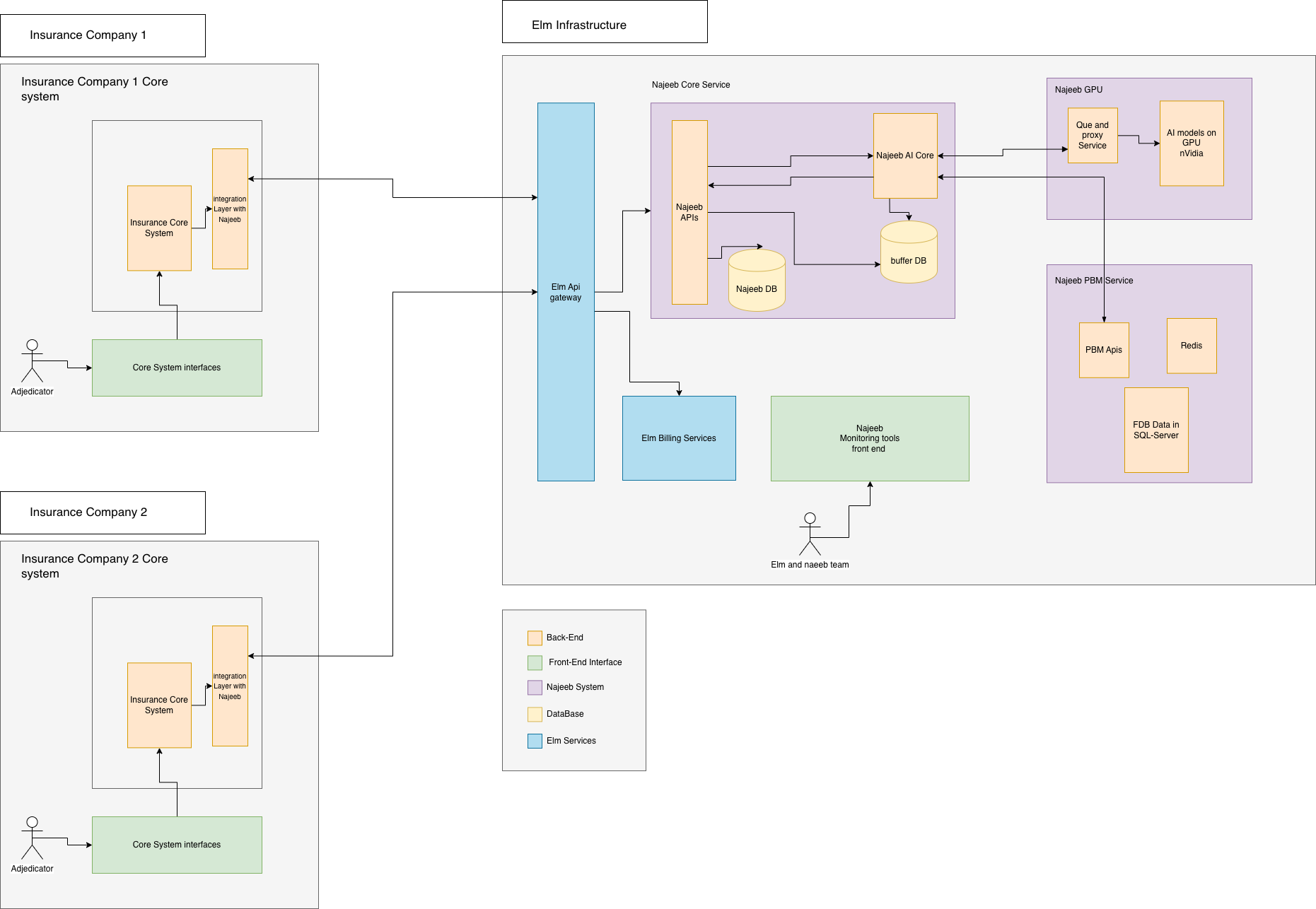
Architecture Components
-
Insurance Company Core System
- Your internal system that prepares and submits claims batches
- Handles batch compression (gZIP)
- Manages webhook endpoint for receiving notifications
- Retrieves and processes results
-
Najeeb Isolated Instance
- A dedicated, single-tenant deployment of Najeeb provisioned exclusively for your organization
- Handles authentication and authorization for your API requests
- Ensures ephemeral data processing
- Enforces rate limiting for your instance
-
Najeeb Claims Service
- Initial validation engine
- Batch queue management
- AI processing engine for fraud detection and validation
- Results generation and storage (temporary)
-
Webhook Service
- Manages webhook subscriptions
- Sends processing status updates
- Delivers validation errors and warnings
- Notifies on processing completion
Integration Guide
The Najeeb Claims as a Service integration involves three main API categories: Upload Batch API, Webhook APIs, and Results Retrieval API. All data processing is ephemeral and handled entirely within your isolated Najeeb instance.
Base URL
https://api.najeeb.ai/v1
Authentication
All API requests require OAuth 2.0 authentication. Include the access token in the Authorization header:
Authorization: Bearer YOUR_ACCESS_TOKEN
For authentication details, see the Authentication Guide.
Important Note on IDs
The IDs required by the API (such as ph_id, provider_id, member_id, claim_id, etc.) are used only to uniquely identify objects within the batch. These IDs do not need to match the actual identifiers or internal IDs used in your insurance company core system.
Example: ph_id (pharmacy/healthcare provider ID) can be generated by the consumer before sending the API request and should not match the actual ID or CCHI ID of the provider. Similarly, member_id does not need to match the actual member identifier in your system. Najeeb uses these IDs internally to:
- Group related claims within the batch
- Detect Fraud, Waste, and Abuse (FWA) patterns
- Maintain relationships between claims, providers, and patients within the batch context
You are free to use any unique identifier scheme that works for your batch processing workflow.
API Endpoints
1. Upload New Batch API
Submit a new claims batch for processing. The batch should be compressed in gZIP format.
Endpoint
POST /claims/batch/upload
Request Headers
| Header | Type | Required | Description |
|---|---|---|---|
Authorization | string | Yes | Bearer token for authentication |
Content-Type | string | Yes | Must be application/json or application/gzip |
Content-Encoding | string | Yes | Must be gzip if content is compressed |
X-Request-ID | string | No | Unique request identifier for tracking |
Request Body
The request body can be sent as JSON or gZIP-compressed JSON:
{
  "start_date": "string",
  "end_date": "string",
  "description": "string",
  "batch_reference_id": "string",
  "claims": [
    {
      // Claim object structure
    }
  ]
}
Request Body Parameters
| Parameter | Type | Required | Description | Accepted Values |
|---|---|---|---|---|
start_date | string | Yes | Start date of the claims period | ISO 8601 format: YYYY-MM-DD |
end_date | string | Yes | End date of the claims period | ISO 8601 format: YYYY-MM-DD |
description | string | No | Description of the batch | Free text, max 500 characters |
batch_reference_id | string | Yes | Unique reference ID for this batch | Alphanumeric string, max 100 characters |
claims | array | Yes | Array of claim objects | Minimum 1 claim required |
Claim Object Structure
Each claim in the claims array should contain the following structure (note: IDs are for batch identification only):
{
  "claim_id": "string (required, unique within batch)",
  "claim_type": "string (required)",
  "claim_sub_type": "string (required)",
  "is_emergency": "boolean (optional)",
  "type_of_encounter": "string (optional)",
  "claim_date": "string (required)",
  "admission_date": "string (optional)",
  "discharge_date": "string (optional)",
  "doctor_specialty": "string (optional)",
  "admission_code": "string (optional)",
  "admission_diagnosis": "string (optional)",
  "primary_diagnosis_code": "string (required)",
  "primary_diagnosis_description": "string (required)",
  "secondary_diagnosis_codes": ["object (optional)"],
  "member_id": "string (required, unique within batch)",
  "member_dob": "string (required)",
  "member_gender": "string (required)",
  "marital_status": "string (optional)",
  "is_vip": "boolean (optional)",
  "provider_id": "string (required, unique within batch)",
  "medical_provider_type": "string (required)",
  "ph_id": "string (required, unique within batch)",
  "days_supply": "number (optional)",
  "is_package": "boolean (optional)",
  "insurance_addition_date": "string (optional)",
  "insurance_start_date": "string (required)",
  "claim_items": ["object (required, min 1)"],
  "pre-auth_number": "string (optional)",
  "pre-auth_status": "string (optional)"
}
Claim Object Parameters
| Parameter | Type | Required | Description | Accepted Values |
|---|---|---|---|---|
claim_id | string | Yes | Unique claim identifier within batch | Alphanumeric string |
claim_type | string | Yes | Type of claim | Enum: PROFESSIONAL, INSTITUTIONAL |
claim_sub_type | string | Yes | Sub-type of claim | Enum: OUT_PATIENT, IN_PATIENT, EMERGENCY |
is_emergency | boolean | No | Flag indicating emergency case | true, false |
type_of_encounter | string | No | Type of encounter | Enum: EMERGENCY, URGENT, ROUTINE |
claim_date | string | Yes | Date of the claim | ISO 8601 format: YYYY-MM-DD |
admission_date | string | No | Admission date (for in-patient) | ISO 8601 format: YYYY-MM-DD |
discharge_date | string | No | Discharge date (for in-patient) | ISO 8601 format: YYYY-MM-DD |
doctor_specialty | string | No | Doctor's medical specialty | String (e.g., "Cardiology", "Orthopedics") |
admission_code | string | No | Admission code | Alphanumeric string |
admission_diagnosis | string | No | Admission diagnosis description | Free text |
primary_diagnosis_code | string | Yes | Primary diagnosis ICD-10 code | Valid ICD-10 code format |
primary_diagnosis_description | string | Yes | Primary diagnosis description | String, max 500 characters |
secondary_diagnosis_codes | array | No | Array of secondary diagnosis objects | See Diagnosis Object below |
member_id | string | Yes | Unique member identifier within batch | Alphanumeric string |
member_dob | string | Yes | Member date of birth | ISO 8601 format: YYYY-MM-DDTHH:mm:ss.sssZ |
member_gender | string | Yes | Member gender | Enum: MALE, FEMALE |
marital_status | string | No | Member marital status | Enum: SINGLE, MARRIED, DIVORCED, WIDOWED |
is_vip | boolean | No | Flag indicating VIP member status | true, false |
provider_id | string | Yes | Unique provider identifier within batch | Alphanumeric string |
medical_provider_type | string | Yes | Type of medical provider | Enum: CLINIC, HOSPITAL, PHARMACY, LABORATORY, RADIOLOGY |
ph_id | string | Yes | Unique pharmacy/healthcare provider identifier within batch | Alphanumeric string |
days_supply | number | No | Days supply (for pharmacy claims) | Integer, minimum 1 |
is_package | boolean | No | Flag indicating package claim | true, false |
insurance_addition_date | string | No | Date when member was added to insurance | ISO 8601 format: YYYY-MM-DD |
insurance_start_date | string | Yes | Insurance policy start date | ISO 8601 format: YYYY-MM-DD |
claim_items | array | Yes | Array of claim item objects | Minimum 1 item required |
pre-auth_number | string | No | Pre-authorization number | Alphanumeric string |
pre-auth_status | string | No | Pre-authorization status | Enum: APPROVED, REJECTED, PENDING |
Claim Item Object
Each claim must include at least one claim item representing a service, procedure, or medication being claimed. The claim item object contains detailed information about the service including codes, descriptions, quantities, and amounts.
The claim item structure is consistent with the Prior Authorization as a Service item structure, allowing for seamless integration between pre-authorization and claims processing workflows.
| Parameter | Type | Required | Description | Accepted Values |
|---|---|---|---|---|
claimed_quantity | number | Yes | Quantity of items claimed | Integer, minimum 1 |
claimed_amount | number | Yes | Claimed amount per unit | Decimal, minimum 0, 2 decimal places |
duration | string | No | Duration of treatment | String (e.g., "10 days") |
admission_date | string | No | Admission date (for in-patient) | ISO 8601 format: YYYY-MM-DDTHH:mm:ss.sssZ |
frequency | string | No | Frequency of service | String (e.g., "10 times", "daily") |
discharge_date | string | No | Discharge date (for in-patient) | ISO 8601 format: YYYY-MM-DDTHH:mm:ss.sssZ |
justification | string | No | Medical justification for service | Free text, max 2000 characters |
erp_item_id | string | No | ERP system item identifier | Alphanumeric string |
service_code | string | Yes | Service code identifier | Alphanumeric string |
service_description | string | Yes | Service description | String, max 500 characters |
nphies_code | string | No | NPHIES code | Alphanumeric string format |
nphies_type | string | No | NPHIES type/category | String (e.g., "UNMAPPED CATEGORY") |
service_type | string | No | Service type/category | String (e.g., "UNMAPPED CATEGORY") |
tooth_id | string | No | Tooth identifier (for dental services) | Alphanumeric string (e.g., "1001") |
Secondary Diagnosis Object
| Parameter | Type | Required | Description | Accepted Values |
|---|---|---|---|---|
type | string | Yes | Type of diagnosis | Must be secondary |
code | string | Yes | ICD-10 diagnosis code | Valid ICD-10 code format |
name | string | Yes | Diagnosis name/description | String, max 500 characters |
Enums
Claim Type Enum:
PROFESSIONAL- Professional servicesINSTITUTIONAL- Institutional services
Claim Sub Type Enum:
OUT_PATIENT- Outpatient servicesIN_PATIENT- Inpatient servicesEMERGENCY- Emergency services
Type of Encounter Enum:
EMERGENCY- Emergency encounterURGENT- Urgent encounterROUTINE- Routine encounter
Member Gender Enum:
MALE- MaleFEMALE- Female
Marital Status Enum:
SINGLE- SingleMARRIED- MarriedDIVORCED- DivorcedWIDOWED- Widowed
Medical Provider Type Enum:
CLINIC- ClinicHOSPITAL- HospitalPHARMACY- PharmacyLABORATORY- LaboratoryRADIOLOGY- Radiology center
Prior Authorization Status Enum:
APPROVED- Pre-authorization approvedREJECTED- Pre-authorization rejectedPENDING- Pre-authorization pending
Remember: claim_id, member_id, provider_id, ph_id, and item IDs are used only for unique identification within the batch. They do not need to match your internal system IDs or actual identifiers (like CCHI IDs). Najeeb uses these IDs to group claims and detect FWA patterns within the batch context.
Example Request (JSON)
curl -X POST "https://api.najeeb.ai/v1/claims/batch/upload" \
  -H "Authorization: Bearer YOUR_ACCESS_TOKEN" \
  -H "Content-Type: application/json" \
  -H "X-Request-ID: req-123456789" \
  -d '{
    "start_date": "2020-07-01",
    "end_date": "2025-07-01",
    "description": "Monthly claims batch for July 2024",
    "batch_reference_id": "BATCH-2024-07-001",
    "claims": [
      {
        "claim_id": "CLM123456",
        "claim_type": "PROFESSIONAL",
        "claim_sub_type": "OUT_PATIENT",
        "is_emergency": false,
        "type_of_encounter": "ROUTINE",
        "claim_date": "2024-07-15",
        "admission_date": null,
        "discharge_date": null,
        "doctor_specialty": "Cardiology",
        "admission_code": null,
        "admission_diagnosis": null,
        "primary_diagnosis_code": "E40",
        "primary_diagnosis_description": "Kwashiorkor",
        "secondary_diagnosis_codes": [
          {
            "type": "secondary",
            "code": "Z24",
            "name": "Need for immunisation against certain single viral diseases"
          }
        ],
        "member_id": "MEMBER-001",
        "member_dob": "1990-01-15T00:00:00.000Z",
        "member_gender": "MALE",
        "marital_status": "SINGLE",
        "is_vip": false,
        "provider_id": "PROV-001",
        "medical_provider_type": "CLINIC",
        "ph_id": "PH-001",
        "days_supply": null,
        "is_package": false,
        "insurance_addition_date": "2023-01-01",
        "insurance_start_date": "2023-01-01",
        "claim_items": [
          {
            "claimed_quantity": 1,
            "claimed_amount": 1000.00,
            "duration": "1 day",
            "admission_date": null,
            "frequency": null,
            "discharge_date": null,
            "justification": "Patient requires pharmacological stress echocardiography for cardiac assessment",
            "erp_item_id": "16562",
            "service_code": "FMCARS0008",
            "service_description": "Pharmacological Stress Echocardiography",
            "nphies_code": "55113-00-00",
            "nphies_type": "UNMAPPED CATEGORY",
            "service_type": "UNMAPPED CATEGORY",
            "tooth_id": null
          }
        ],
        "pre-auth_number": "AUTH-2024-001",
        "pre-auth_status": "APPROVED"
      }
    ]
  }'
Example Request (gZIP Compressed)
# Compress the JSON file first
gzip -c claims_batch.json > claims_batch.json.gz

# Send the compressed file
curl -X POST "https://api.najeeb.ai/v1/claims/batch/upload" \
  -H "Authorization: Bearer YOUR_ACCESS_TOKEN" \
  -H "Content-Type: application/gzip" \
  -H "Content-Encoding: gzip" \
  -H "X-Request-ID: req-123456789" \
  --data-binary @claims_batch.json.gz
Response
Success Response (202 Accepted)
The batch has been accepted for processing. Processing will begin asynchronously.
{
  "batch_id": "batch_abc123xyz",
  "batch_reference_id": "BATCH-2024-07-001",
  "status": "queued",
  "total_claims": 150000,
  "total_items": 450000,
  "submitted_at": "2024-07-16T10:30:00.000Z",
  "estimated_completion_time": "2024-07-16T14:30:00.000Z",
  "webhook_url": "https://your-webhook-endpoint.com/claims",
  "message": "Batch accepted for processing. You will receive webhook notifications as processing progresses."
}
Response Fields
| Field | Type | Description |
|---|---|---|
batch_id | string | Unique batch identifier assigned by Najeeb |
batch_reference_id | string | The reference ID you provided |
status | string | Current batch status (queued, validating, processing, completed, failed) |
total_claims | number | Total number of claims in the batch |
total_items | number | Total number of items across all claims |
submitted_at | string | Timestamp when batch was submitted (ISO 8601) |
estimated_completion_time | string | Estimated completion time (ISO 8601) |
webhook_url | string | Confirmed webhook URL for notifications |
message | string | Human-readable message |
Validation Error Response (400 Bad Request)
If initial validation fails, the API returns errors before processing begins:
{
  "error": {
    "code": "VALIDATION_ERROR",
    "message": "Batch validation failed",
    "details": [
      {
        "field": "start_date",
        "reason": "Start date must be before end date",
        "claim_index": null
      },
      {
        "field": "claims[0].claim_items",
        "reason": "At least one claim item is required",
        "claim_index": 0
      }
    ]
  },
  "batch_reference_id": "BATCH-2024-07-001",
  "timestamp": "2024-07-16T10:30:00.000Z"
}
If validation errors are found, a webhook event will also be sent to your registered webhook endpoint with the validation details before the API returns the error response.
2. Webhook APIs
Webhooks are essential for receiving processing updates. You must subscribe to webhooks before submitting batches.
Subscribe to Webhooks
POST /webhooks/subscribe
Request Body
{
  "webhook_url": "https://your-endpoint.com/webhooks/claims",
  "events": [
    "batch.queued",
    "batch.validating",
    "batch.processing",
    "batch.validation_failed",
    "batch.completed",
    "batch.failed"
  ],
  "secret": "your-webhook-secret"
}
Response
{
  "subscription_id": "sub_abc123",
  "webhook_url": "https://your-endpoint.com/webhooks/claims",
  "status": "active",
  "events": [
    "batch.queued",
    "batch.validating",
    "batch.processing",
    "batch.validation_failed",
    "batch.completed",
    "batch.failed"
  ],
  "created_at": "2024-07-16T10:00:00.000Z"
}
Webhook Events
batch.queued
Sent when batch is accepted and queued for processing.
{
  "event_type": "batch.queued",
  "event_id": "evt_123456",
  "timestamp": "2024-07-16T10:30:00.000Z",
  "data": {
    "batch_id": "batch_abc123xyz",
    "batch_reference_id": "BATCH-2024-07-001",
    "total_claims": 150000,
    "total_items": 450000
  }
}
batch.validating
Sent when initial validation begins.
{
  "event_type": "batch.validating",
  "event_id": "evt_123457",
  "timestamp": "2024-07-16T10:30:05.000Z",
  "data": {
    "batch_id": "batch_abc123xyz",
    "batch_reference_id": "BATCH-2024-07-001",
    "validation_progress": 0
  }
}
batch.validation_failed
Sent if validation errors are found before AI processing.
{
  "event_type": "batch.validation_failed",
  "event_id": "evt_123458",
  "timestamp": "2024-07-16T10:30:10.000Z",
  "data": {
    "batch_id": "batch_abc123xyz",
    "batch_reference_id": "BATCH-2024-07-001",
    "errors": [
      {
        "field": "claims[0].claim_items",
        "reason": "At least one claim item is required",
        "claim_index": 0
      }
    ]
  }
}
batch.processing
Sent when AI processing begins (after successful validation).
{
  "event_type": "batch.processing",
  "event_id": "evt_123459",
  "timestamp": "2024-07-16T10:35:00.000Z",
  "data": {
    "batch_id": "batch_abc123xyz",
    "batch_reference_id": "BATCH-2024-07-001",
    "processing_progress": 0,
    "estimated_completion_time": "2024-07-16T14:30:00.000Z"
  }
}
batch.processing_update
Sent periodically during processing to show progress.
{
  "event_type": "batch.processing_update",
  "event_id": "evt_123460",
  "timestamp": "2024-07-16T12:00:00.000Z",
  "data": {
    "batch_id": "batch_abc123xyz",
    "batch_reference_id": "BATCH-2024-07-001",
    "processing_progress": 45,
    "claims_processed": 67500,
    "total_claims": 150000,
    "estimated_completion_time": "2024-07-16T14:30:00.000Z"
  }
}
batch.completed
Sent when processing is complete and results are ready.
{
  "event_type": "batch.completed",
  "event_id": "evt_123461",
  "timestamp": "2024-07-16T14:25:00.000Z",
  "data": {
    "batch_id": "batch_abc123xyz",
    "batch_reference_id": "BATCH-2024-07-001",
    "total_claims": 150000,
    "processed_claims": 149850,
    "failed_claims": 150,
    "processing_time_seconds": 14100,
    "results_available_until": "2024-07-23T14:25:00.000Z"
  }
}
batch.failed
Sent if processing fails due to system errors.
{
  "event_type": "batch.failed",
  "event_id": "evt_123462",
  "timestamp": "2024-07-16T14:30:00.000Z",
  "data": {
    "batch_id": "batch_abc123xyz",
    "batch_reference_id": "BATCH-2024-07-001",
    "error": "Processing failed due to system error",
    "error_code": "PROCESSING_ERROR"
  }
}
3. Get Results API
Retrieve processed results after batch processing is complete.
Endpoint
GET /claims/batch/{batch_id}/results
Path Parameters
| Parameter | Type | Required | Description |
|---|---|---|---|
batch_id | string | Yes | Batch ID returned from upload API |
Query Parameters
| Parameter | Type | Required | Description |
|---|---|---|---|
format | string | No | Response format (json, csv) |
page | integer | No | Page number for paginated results |
per_page | integer | No | Items per page |
filter | string | No | Filter results (all, flagged, approved, rejected) |
Example Request
curl -X GET "https://api.najeeb.ai/v1/claims/batch/batch_abc123xyz/results?format=json&page=1&per_page=1000&filter=flagged" \
  -H "Authorization: Bearer YOUR_ACCESS_TOKEN"
Response
{
  "batch_id": "batch_abc123xyz",
  "batch_reference_id": "BATCH-2024-07-001",
  "status": "completed",
  "processed_at": "2024-07-16T14:25:00.000Z",
  "total_claims": 150000,
  "processed_claims": 149850,
  "failed_claims": 150,
  "summary": {
    "approved": 120000,
    "flagged": 25000,
    "rejected": 4850,
    "FWA_cases": 0
  },
  "claims": [
    {
      "claim_id": "CLM-001",
      "status": "flagged",
      "erp_claim_id": "16562",
      "claim_items": [
        {
          "erp_claim_item_id": "FMCARS0008",
          "status": "REJECTED",
          "ai_score": 84,
          "reasons": [
            {
              "id": 468519,
              "createdAt": "2025-06-21T10:17:24.657",
              "code": "00",
              "description": "Accepted according to Saudi Arabia guidelines for health insurance",
              "cause": "Accepted according to Saudi Arabia guidelines for health insurance.",
              "typeDecision": "APPROVE",
              "source": "AI"
            }
          ]
        }
      ]
    }
  ],
  "meta": {
    "page": 1,
    "per_page": 1000,
    "total_pages": 150,
    "total_results": 149850
  }
}
Response Fields
| Field | Type | Description |
|---|---|---|
batch_id | string | Unique batch identifier |
batch_reference_id | string | The reference ID you provided |
status | string | Batch processing status (completed, failed) |
processed_at | string | Timestamp when processing completed (ISO 8601) |
total_claims | number | Total number of claims in the batch |
processed_claims | number | Number of claims successfully processed |
failed_claims | number | Number of claims that failed processing |
summary | object | Summary statistics (see Summary Object below) |
claims | array | Array of processed claim objects (see Claim Result Object below) |
meta | object | Pagination metadata |
Summary Object
| Field | Type | Description |
|---|---|---|
approved | number | Number of approved claims |
flagged | number | Number of flagged claims (requires review) |
rejected | number | Number of rejected claims |
FWA_cases | number | Number of Fraud, Waste, and Abuse cases detected |
Claim Result Object
| Field | Type | Description |
|---|---|---|
claim_id | string | Claim ID from the batch |
status | string | Claim status (approved, flagged, rejected) |
erp_claim_id | string | ERP claim identifier from your system |
claim_items | array | Array of claim item results (see Claim Item Result Object below) |
Claim Item Result Object
| Field | Type | Description |
|---|---|---|
erp_claim_item_id | string | ERP claim item identifier from your system |
status | string | Item status (APPROVED, REJECTED, FLAGGED) |
ai_score | number | AI confidence score (0-100) |
reasons | array | Array of decision reasons (see Reason Object below) |
Reason Object
| Field | Type | Description |
|---|---|---|
id | number | Unique reason identifier |
createdAt | string | Timestamp when reason was generated (ISO 8601) |
code | string | Reason code |
description | string | Human-readable description |
cause | string | Detailed cause explanation |
typeDecision | string | Decision type (APPROVE, REJECT, FLAG) |
source | string | Source of the decision (AI, RULE, MANUAL) |
Error Handling
Error Codes
| Error Code | HTTP Status | Description | Resolution |
|---|---|---|---|
INVALID_REQUEST | 400 | Request validation failed | Check request parameters and format |
MISSING_REQUIRED_FIELD | 400 | Required field is missing | Include all required fields |
INVALID_DATE_FORMAT | 400 | Date format is invalid | Use ISO 8601 format (YYYY-MM-DD) |
INVALID_BATCH_SIZE | 400 | Batch size exceeds limits | Reduce batch size or split into multiple batches |
INVALID_COMPRESSION | 400 | gZIP compression is invalid | Verify gZIP format |
BATCH_TOO_LARGE | 413 | Batch exceeds maximum size | Split into smaller batches |
UNAUTHORIZED | 401 | Authentication failed | Verify access token |
FORBIDDEN | 403 | Insufficient permissions | Contact support for access |
BATCH_NOT_FOUND | 404 | Batch not found | Verify batch ID |
BATCH_NOT_READY | 409 | Batch processing not complete | Wait for completion webhook |
RATE_LIMIT_EXCEEDED | 429 | Too many requests | Implement rate limiting |
INTERNAL_ERROR | 500 | Internal server error | Retry request or contact support |
SERVICE_UNAVAILABLE | 503 | Service temporarily unavailable | Retry after delay |
Best Practices
- Webhook Subscription: Always subscribe to webhooks before submitting batches
- Batch Size: Consider splitting very large batches (> 1M items) into multiple smaller batches for better progress tracking
- gZIP Compression: Use gZIP compression for large batches to reduce upload time
- ID Generation: Generate unique IDs for batch objects; they don't need to match your internal IDs
- Error Handling: Implement robust error handling for webhook events
- Results Retrieval: Retrieve results promptly after completion notification (results are available for 7 days)
- Monitoring: Monitor webhook delivery and implement retry logic for failed deliveries
- Validation: Validate your data format before submission to avoid validation errors
- Rate Limiting: Respect rate limits and implement exponential backoff
- Logging: Log all batch submissions, webhook events, and results for audit purposes
Data Processing
All data processing is ephemeral, meaning:
- Data is processed temporarily within your isolated Najeeb instance
- No persistent storage of claim data (except for temporary results storage)
- Results are available for 7 days after processing completion
- Data is securely handled and encrypted in transit
- Compliance with KSA data protection regulations
- No cross-batch analysis or historical data retention
Rate Limits
- Standard Tier: 10 batch uploads per hour
- Enterprise Tier: Custom limits based on agreement
Rate limit headers are included in responses:
X-RateLimit-Limit: 10
X-RateLimit-Remaining: 9
X-RateLimit-Reset: 1642248000
Next Steps
- Getting Started Guide - Begin your integration
- Authentication Guide - Set up authentication
- Webhooks Documentation - Learn about webhook integration
- Error Handling - Handle errors properly